

CAD/CAM Software: Some Most Popular Ones Used for CNC
CAD (Computer-Aided Design) and CAM (Computer-Aided Manufacturing) software is the type of software you can use to build 2D or 3D designs for your prototypes, hardware parts, and components. You can use the data from the CAD/CAM software for the CNC machining process by converting them into the command configurations that the CNC machining equipment can understand.
Using the right CAD/CAM software, you can create the best 2D and 3D designs for the CNC machining process, which will also help you create more accurate, complex, and precise components, parts, and prototypes for your projects. Here’s the top 8 CAD/CAM software you can use for CNC manufacturing:
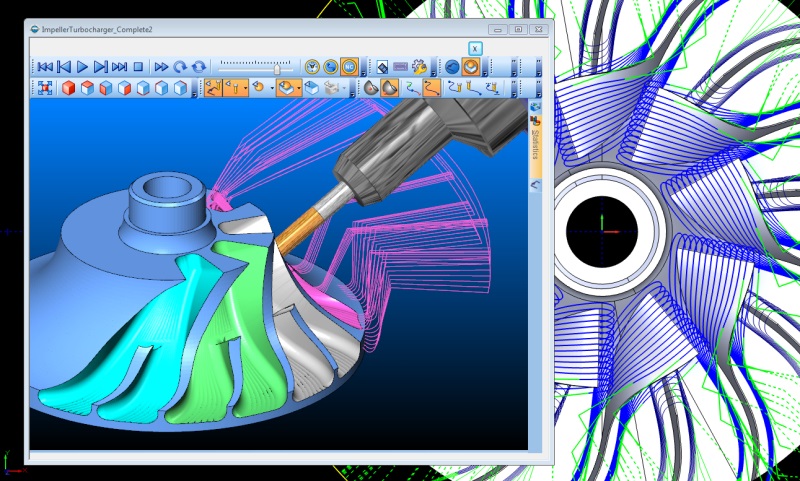
1. AutoCAD CAD/CAM software
AutoCAD is a popular 2D and 3D modeling software that features various toolsets to make it easier for you to produce the best design for your projects. These tool sets include mechanical, architecture, MEP, map 3D, plant 3D, electrical, and raster design.
With AutoCAD, you can work on your design via desktop, web, and mobile apps, and you can collaborate with your teammates for the most efficient workflow. You can also automate certain tasks, such as adding blocks, drawing, counting, and many others, to get your project done even faster.
2. Carbide Create
Carbide Create is a CAD/CAM software you can use for CNC routers, which allows you to create both basic and detailed designs. With this software, you can create your design with basic shapes, splines, text, alignment, background images, offsets, Booleans, and various design elements. It also provides you with various machining tools, such as V-carving, pockets and contours, engraving, a tool library, speeds and feeds, and 3D simulation.
You can use Carbide Create to turn your ideas into the 3D design you would like to produce. You can install this software for Windows and Mac, and it doesn’t need an active internet connection.
3. Autodesk Fusion 360 CAD/CAM software
Autodesk Fusion 360 offers CAD/CAM software that can help unify the processes of engineering, design, electronics, and manufacturing in one simple workflow. You can use this software to design simple and complex prototypes, hardware parts, PCB electronics, and components using flexible 3D modeling.
Autodesk Fusion 360 offers various features, including flexible 3D CAD, integrated CAD and CAM, unified PCB design, seamless 3D simulation, generative design tools, and instant on-data management. This software also provides photo-realistic rendering and documentation, which you can annotate with ease.
4. Inkscape
Inkscape is a free and open-source drawing software that you can use as an alternative to various professional CAD/CAM software. This software can help you create basic and complex designs, which you can import to the CNC machining equipment later. The object creation tools offered in this software include drawing, shape tools, text tools, embedded bitmaps, and clones.
Aside from that, Inkscape also provides various other features, such as object manipulation, fill and stroke, operations on the path, rendering, text support, and various file format supports. For object manipulation, you can use various tools, such as transformations, grouping objects, layers, alignment and distribution commands, and Z-order operations.
5.SolidWorks CAD/CAM software
SolidWorks provides various CAD/CAM tools you can use for design creation, engineering, collaboration, and manufacturing. With this software, you can create a 3D design for CNC machining, and you can also take advantage of its collaborative operations to work with your team members and create the best workflow for your projects.
SolidWorks also provides solutions to help you perform CNC machining on various complex parts, whether you are using CNC robots or multi-axis milling machines. Aside from that, SolidWorks will also validate your 3D design to detect potential machining errors before putting it into production.
6.AlphaCAM
AlphaCAM is a CAM/CAD software you can use to create 3D designs for metalworks, stoneworks, and woodworking projects. It offers various key design features, which include interactive sculpting and blending, building 3D shapes from various vector outlines, importing 3D clipart and mesh models, 3D component manager, and more.
You can also use AlphaCAM for machining various simple and complex parts, whether in 2D or 3D, which include engraving, lathe, stone cutting, thread milling, 3D Disc machining, and many others. This software also supports designing for part repairs and modifications, and you can also use it for remote monitoring of CNC machines.
7. Solid Edge CAM Pro CAD/CAM software
Solid Edge CAM Pro provides computer-aided manufacturing software that can help you create the 2D or 3D design that will work best for CNC machining equipment. It uses an intuitive user interface that allows you to create your 3D design in the easiest way possible, with guides, tutorials, and templates you can use to start your project right away.
You can use Solid Edge CAM Pro for feature-based machining, milling, turning, and NC simulation. It also offers you a large online post-processor library that allows you to get access to thousands of post-processors you can use to generate production-ready CNC programs.
8.FreeCAD
FreeCAD provides free CAD software you can use to create 3D designs for your project, which you can send to the CNC milling service and CNC turning equipment later. It is a parametric 3D modeler that you can use to design various parts, components, and prototypes with accuracy and precision. You can transform a 2D design into a 3D model and vice versa with this software.
With FreeCAD, you can create various 3D designs in architecture and mechanical engineering. So, it’s an excellent choice of CAD software to use, whether you are a hobbyist, student, or professional. You can also use this software to learn from scratch about 3D design and modeling.
Comparison of Top CAD/CAM Software for CNC
| Software | Best suited for | Key features | Pros | Cons |
|---|---|---|---|---|
| Autodesk Fusion 360 | Small to medium-sized workshops, startups, prototyping | Cloud-based CAD + CAM + CAE in one platform. Supports 2.5-axis through 5-axis machining. | Very versatile, good for collaboration, lower entry cost. | Requires Internet/cloud for full features; may be less ideal for very large enterprise workflows. |
| SolidWorks | Mechanical engineers, product design, moderate CNC manufacturing | Strong in 3D modelling, parametric design, large user base, integrates with CAM add-ons. | User friendly, large ecosystem, well-supported. | CAM functionality may depend on add-ons; higher cost; Windows only. |
| Mastercam | CNC machinists, shops needing advanced toolpathing | Primarily a CAM solution with CAD tools-it’s highly used in machinist-side toolpath generation. | Excellent for advanced machining, industry recognition. | Higher cost; steeper learning curve; mostly CAM-focused rather than full CAD. |
| CATIA (by Dassault Systèmes) | Large enterprises, aerospace, automotive, complex surfaces | High-end CAD/CAM/CAE/PLM with powerful surface modelling and large assembly handling. | Very capable for complex geometry and large scale R&D/manufacturing. | Very high cost; long learning curve; may be overkill for smaller CNC shops. |
| Siemens NX / High-end CAD/CAM | Enterprise scale manufacturing / multi-axis machining | Advanced toolpath generation, simulation, integration with PLM, supports 5-axis and beyond. | Extremely powerful; future-proof for large scale manufacturing. | Very expensive; hardware-intensive; requires specialist training. |
How to Choose the Right Software for Your CNC Workflow
To help your readers decide, you can include these criteria:
- Production volume & complexity – For high-volume or multi-axis jobs, a full CAM-centric tool like Mastercam or NX may be justified. For prototyping or 3-axis parts, Fusion 360 or SolidWorks suffice.
- Budget & licensing model – Some software has subscription models, some high upfront cost. Startup workshops favour lower cost/entry-level tools.
- Integration & workflow – If your workflow requires CAD + CAM in one seamless tool, tools like Fusion 360 offer that. If CAD is done separately and CAM specialized, a CAM-only system might be fine.
- Skill level & training – Simpler software will speed up ramp-up; more advanced tools require skilled staff.
- Machine compatibility & toolpaths – Ensure the software supports your CNC machine’s axes, tooling, material types and post-processors.
- Collaboration & cloud support – If your teams are remote or distributed, cloud/collaboration features matter (e.g., Fusion 360).
- Industry requirements – For regulated sectors (aerospace, automotive), enterprise-grade software with full PLM, simulation, and multi-axis may be needed.
Conclusion
These are the top CAD and CAM software you can use in your 2D and 3D design process. You can get your design process done and send the data to the CNC machining equipment before putting it into mass production. The CNC machining equipment will convert the data you have sent from the software into actual CNC machining programs, which will contain certain instructions for various CNC machining operations to rapid prototyping services, or making component, and sheet metalwork.
Contact TEAM RAPID
Pick one of the CAD/CAM software listed in this guide to get the best 2D and 3D design experience in your project. You can also choose between free or open-source and premium professional CAD/CAM software, depending on your needs. TEAM Rapid has decades of product design and rapid manufacturing experience, we have 30 excellent product design and mold design engineers and 20 excellent mold processing engineers. Our processing equipment has 10 advanced CNC lathes, 5 rotary machines, 3 grinding machines, 8 EDM cutting machines, etc., we also have 20 stamping machine tools, and 60 large injection molding machines, we undertake global product OEM design and processing orders, to provide you with integrated product design, manufacturing, transportation solutions. Contact us today for your upcoming projects.
FAQs
What are the main benefits of using CAD/CAM software for CNC machining?
CAD/CAM software is essential for modern CNC machining because it streamlines the process from design to production. CAD (Computer-Aided Design) allows engineers to create precise 2D and 3D models, while CAM (Computer-Aided Manufacturing) generates optimized CNC toolpaths. This integration reduces human error, shortens production times, and ensures high-quality parts. Using CAD/CAM is particularly valuable for rapid prototyping, low-volume manufacturing, and complex CNC projects where accuracy and efficiency are crucial.
Which CAD/CAM software is best for beginners versus professional users?
For beginners, Fusion 360 and FreeCAD are ideal because they offer intuitive interfaces, easy learning curves, and cloud-based collaboration. Professional users often prefer advanced platforms like SolidWorks, Mastercam, or Siemens NX, which provide multi-axis machining, simulation tools, and extensive industry-standard compatibility. Selecting the best CAD/CAM software for CNC depends on project complexity, production volume, and required features for efficient CNC prototyping and manufacturing.
Can CAD/CAM software improve efficiency in low-volume or rapid prototyping projects?
Yes. CAD/CAM software allows designers and manufacturers to iterate quickly, simulate toolpaths, and generate CNC programs efficiently. This makes it ideal for low-volume manufacturing and rapid prototyping, where minimizing setup time and avoiding errors is critical. Many CNC shops in the USA and Europe rely on CAD/CAM tools to accelerate product development, reduce material waste, and achieve faster time-to-market.
How do I ensure my CAD design is compatible with CNC machining?
Ensuring compatibility starts with exporting your CAD files in the correct formats, such as STEP, IGES, or STL, which are widely supported by CAM software. Verify that your CAM tool can generate machine-specific G-code for your CNC equipment. Running simulations in your CAM environment before machining helps prevent errors and saves both time and materials. Following these best practices ensures seamless integration from CAD design to CNC production for accurate prototyping and manufacturing.
What common challenges do manufacturers face when using CAD/CAM software, and how can they be avoided?
Common challenges include incorrect toolpath settings, software that doesn’t match the CNC machine capabilities, and file format incompatibilities. To avoid these issues, choose software tailored to your CNC setup, maintain an updated tool library, and always simulate toolpaths before machining. Proper training and workflow planning help manufacturers maximize efficiency, reduce costly mistakes, and achieve consistent results in CNC prototyping and low-volume production.